Summarizing YouTube for Real Learning (Not Just Shorter)
Turn long videos into something you can navigate, remember, and act on using Learnex anchors, concept graphs, and study guides.
Learnex doesn’t spit out random bullet points. It gives you transcripts with timestamps, key-moment detection, concept graphs, mind maps, and study guides. When you string those together, you get summaries that help you navigate, remember, and act. Keep it lean, but tie it to the product.
Why summaries need structure
- Navigation: every bullet should link back to a Learnex anchor.
- Memory: concept clusters beat raw chronology.
- Action: finish with practice prompts or next steps (study guide, flashcards, next video).
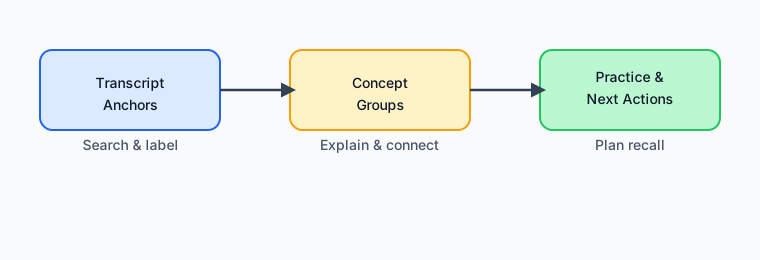
Three-part workflow inside Learnex
- Anchors: Paste a video and let Learnex extract the transcript + key moments. Capture 5–7 timestamps and label them (definition, example, claim, pitfall) so you know why they matter.
- Concept groups: Open the concept graph or mind map and drag anchors into clusters. Rename each group with a verb (“prevents overfitting”) and jot one sentence explaining the relationship.
- Practice + next actions: Turn each group into a checkpoint question or flashcard. Drop them into the generated study guide so Learnex can remind you to revisit them.
Quick checklist
- Every summary bullet links back to a Learnex anchor or concept node.
- You can re-create the concept clusters without looking at the timeline.
- You scheduled at least three practice prompts (study guide tasks, flashcards, or another video).
Try it now
- Paste any lecture. Learnex will produce the transcript, key moments, concept graph, and first-pass summary.
- Tag the anchors and tidy the concept graph until it reflects how you understand the topic.
- Open the study guide and rewrite the generated bullets as checkpoint questions. Save or export.
Related: Transcript Analysis · From Video to Study Guide